Read one message five ways.
Sam sent a quick update about a client project. Choose a style to see how Meet explains it to you. In the app, you set a default and can switch on any message.
The client loved round 1! The only changes are to shorten the hero headline to under 8 words and swap the photo for the team photo from the shoot. No rush—end of week is fine.
Pick how you want messages explained. Sam's words never change, and the original is always one tap away.
Two small edits, no rush, by the end of the week: a shorter headline and the team photo.
The client is happy with the first version. They want two changes: make the big headline at the top shorter (fewer than 8 words), and use the team photo from the photo shoot instead of the current picture. It isn't urgent. Any time before the end of the week works.
Sam is passing on positive client feedback on round 1 and limits the revisions to exactly two items.
- Headline: the hero headline must be under 8 words. No new wording was provided, so the rewrite is yours.
- Photo: replace the current hero image with the team photo from the shoot. Sam didn't say which frame; ask if there's more than one.
- Timing: no urgency. End of week is the stated deadline.
- Rewrite the hero headline in fewer than 8 words.
- Swap the hero image for the team photo from the shoot.
- Send round 2 to Sam by the end of the week.
Sam says the client loved round 1. The requested updates are to shorten the hero headline to under 8 words and replace the current photo with the team photo from the shoot. Sam says it can be done by the end of the week, with no urgency.
Demo content. The Visual explanation is Meet's real output for this message; the other styles were written for this page to show each format. In the app, Meet writes the explanation for every message you receive.
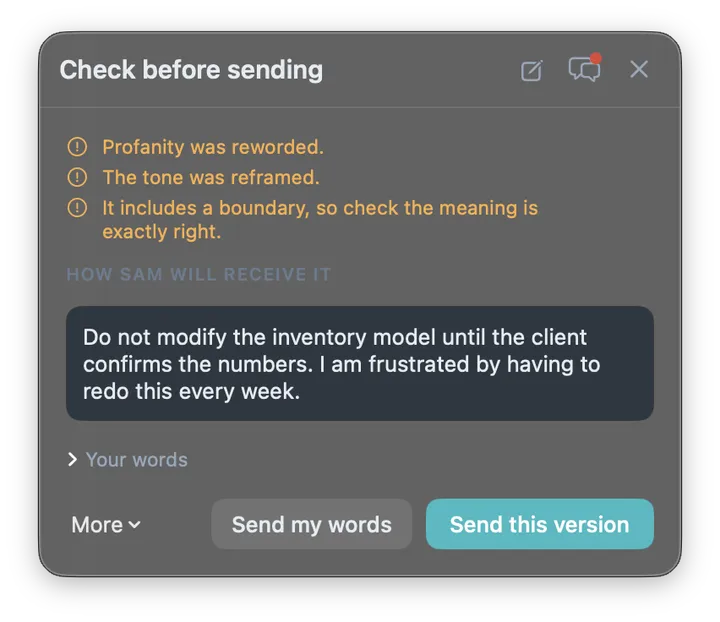
Heated message in, clear instruction out.
This is a real Meet screen. The manager's message was blunt and profane. Meet kept the instruction, the condition and the urgency, and asked the manager to approve the new wording before it went out.
Ready to try it with your own messages?
The Free plan covers up to 3 people. No card needed.